How to Save in Permafrost: Manual Save, Autosave and Beds
Where to find Permafrost's Save Game menu option and how to distinguish manual saves, autosave notifications and claimed beds for respawning.
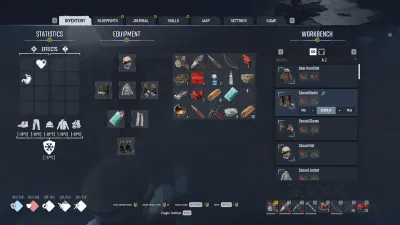
Manual saving: exact in-game menu path
- While in your world, press Esc to open the menu.
- Choose the GAME tab. In the October 2026 captured UI, this is distinct from the Inventory, Blueprints, Journal and Map tabs.
- Select SAVE GAME. Wait for the interface to finish. If you see a failure or interruption, don’t assume the action completed.
- Return to the main menu normally when ready to end the session. On your next launch, confirm your world contains the expected progress.
This menu path is documented by an early-build captured save and respawn guide, not based on an imagined universal keyboard shortcut.
What autosave does — and doesn’t prove
Players may see “Autosaving…” with a small disk indicator. That shows a save operation at that point; it does not tell us exactly how many minutes elapse between autosaves or guarantee that every subsequent change has already persisted. When available, use the explicit Save Game option before risky exploration.
Is a bed a save point?
A Bed or Sleeping Bag gives you a home respawn position for death or a relevant respawn interaction. In Horizon’s bunkhouse, the opening walkthrough shows a sleeping bag that can be claimed. This is separate from the state of your current inventory, story quests or last manual save.
| Action | What it changes |
|---|---|
| GAME → SAVE GAME | Records game progress in the current supported save system |
| Autosaving indicator | Shows an automatic save is happening |
| Claim a Bed / Sleeping Bag | Sets the point where your survivor can respawn |
Co-op worlds and character saves
The developer’s pinned co-op instructions say characters are tied to a world. If your friend hosts a different world later, your solo character will not simply appear there. For continuing co-op, the host must return to the same hosted world.
For a safe opening setup, follow the beginner route. If your game fails to start before you can save, go to crash troubleshooting and multiplayer setup for the appropriate path.
Related Articles
guides
Permafrost Base Building: First Shelter and New Home Quest
A practical Permafrost New Home building plan with observed materials for foundation, walls, bed, Workbench, Stone Furnace and Radio Station.
guides
Permafrost Beginner Guide: Your First Hour
Survive Permafrost's first hour with the real starting quest order, Stone tool recipes, campfire controls, Horizon route and first shelter checklist.
guides
Permafrost Crafting Guide: Tools, Furnace and Wire Recipes
Use real early-build Permafrost crafting requirements for Flint tools, Workbench, Stone Furnace, Copper Ingots, Wire and the Radio Station Bench.
Was this helpful?
Thanks for the feedback!